Using navigate Screen with BottomNavBar
We can use navigateScreen for combining functionality of BottomNavBar together with it for daily tasks like beside using BottomNavBar items to navigate across different screens, we can also make use of navigateScreen here to navigate across screen keeping the bottomNavBAr in place as well. Let us look at an example to make better sense of it.
Example
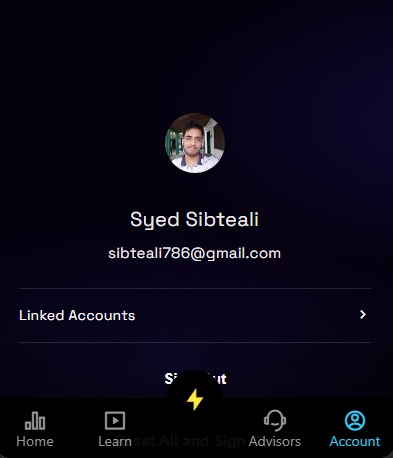
In this scenario we want to navigate to Profile screen using Account item in the bottomNavBar menu and also an icon in our dashboard screen. Given is code for different screen widgets CustomHeader for our screen header with an Profile Picture and ViewGroup with bottomNavBar.
Explanation
- For each item in the menu we have used an expression which evaluates
selectedIndexevery time our screen re-renders ( it renders whenever user navigates from one screen to other screen using menu items ). - Account item have
selectedIndexof 4 as we are sending it as input fromnavigateScreenaction in thedashboardscreen’sCustomHeaderwidget. - So when we click on Profile Picture in the header for dashboard screen the bottomNavbar re-renders updating selectedIndex value which evaluates true for only
Accountitem and thus we move to profile screen using bothAccountItem and theProfile Picture
Code
CustomHeader:
  body:
    Row:
      styles:
        mainAxis: spaceBetween
        crossAxis: center
        backgroundColor: 0xff04010d
      children:
        - Markdown:
            styles:
              textStyle:
                fontSize: 16
                color: white
            text: Your Goals
        - Image:
            styles:
              width: 40
              height: 40
              borderRadius: 40
              placeholderColor: transparent
            source: ${auth.user.photo}
            onTap:
              navigateScreen:
                name: App
                inputs:
                  selectedIndex: 4
ViewGroup with BottomNavBar
ViewGroup:
  BottomNavBar:
    styles:
      backgroundColor: 0xEE000000
      floatingBackgroundColor: black
      floatingIconColor: yellow
      notchColor: black
      selectedColor: 0xFF34CAF7
      color: 0xFF999999

    items:
      - label: Home
        icon:
          name: bar_chart_2_line
          library: remix
        page: Home

      - label: Learn
        icon:
          name: movie_line
          library: remix
        page: Insights

      - label: Advisors
        icon:
          name: customer_service_2_line
          library: remix
        page: Advisors

      - label: Account
        icon:
          name: account_circle_line
          library: remix
        page: Account
        selected: "${selectedIndex == 4 ? true : false}"

      - icon:
          name: flashlight_fill
          library: remix
        floating: true
        floatingAlignment: center
        floatingMargin: 0
        onTap:
          navigateScreen:
            name: ChatPage
            inputs:
              threadId: 0
              userId: "${ensemble.storage.userAccount != null ? ensemble.storage.userAccount.id : ''}"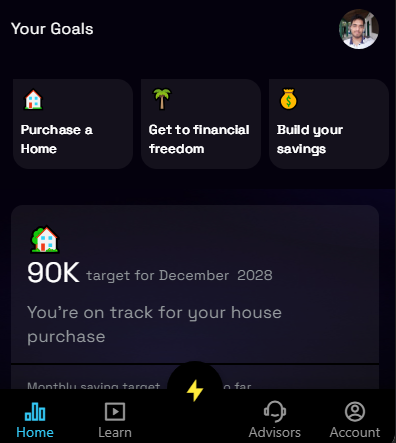
Last updated on